
GMB Helper.ai

Google Business Profile verification

Stuck on Google Business Profile verification? Get the code, or pass the video.

Google decides how a profile can verify, and for a business that has been suspended or edited heavily the answer is usually a video. GMB Helper.ai asks Google what your profile can get, sends the code when there is one, and when it is video, tells you exactly what to film so it passes the first time.

Fix my verification
  • Phone and text codes sent from the app
  • Shot list for the video
  • Result watched every 30 minutes
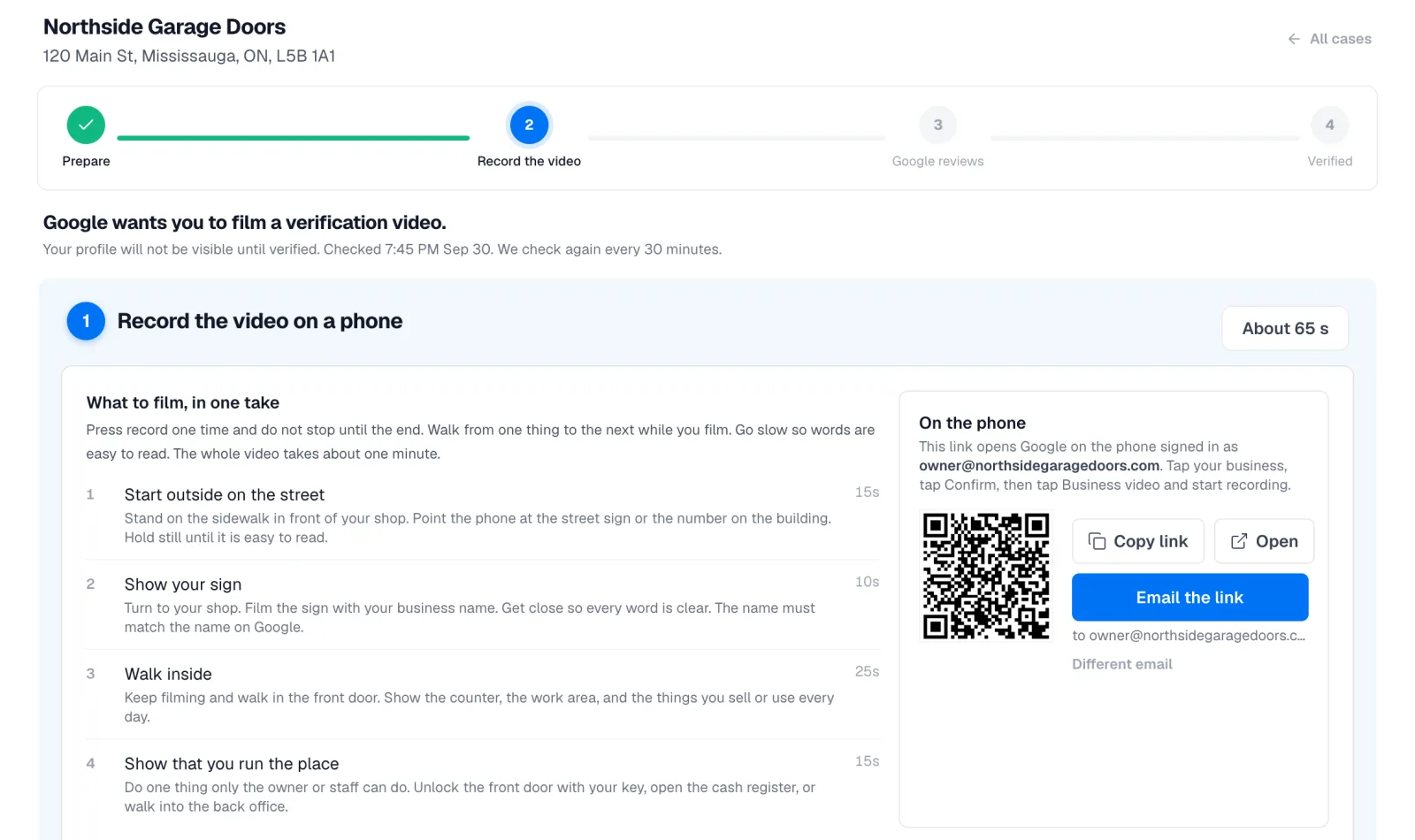
GMB Helper verification case at the Record the video step, with the timed shot list and the QR code that opens Google on the phone
The shot list, the timing, and the link that opens Google’s own verification flow on the phone.

What is going on

Why Google keeps asking for a video

Verification is how Google confirms that a real business operates at a real place under the name on the profile. A brand-new profile with a clean address often gets a postcard or a quick phone code. A profile that was suspended, moved, renamed, or created by a marketing company usually gets exactly one option: record a video walkthrough on your phone inside Google’s own app.

The video is where people get stuck. Google wants to see the surroundings that prove the location, the signage or vehicle that proves the business, and something only the owner could do that proves authority. A video that skips one of those, or that shows a name on the sign that does not match the profile, comes back rejected with no explanation, and each attempt costs days.

Service-area businesses have an extra hurdle. Google shows no address for them publicly, but it still needs one to run verification against, so it asks for the base address before anything can start.

How GMB Helper.ai handles it

From “verify your business” to verified

The verification lane runs as its own case, or as the final step of a reinstatement when Google lifts a suspension but wants re-verification first.

  1. 1

    We ask Google what you can get

    The app asks Google for the verification methods available to that exact profile. When a phone call or text code is offered, that is what you see first. Postcard or email show only when Google offers nothing faster.

  2. 2

    Code by phone or text

    Choose the method, the code is sent, you type it in, and the profile is verified without leaving the app. Automation that paused while the profile was unverified switches itself back on.

  3. 3

    Profile problems are fixed first

    Before a video is filmed, the profile is checked for the things that make videos fail: a name on the sign that will not match, an address style Google rejects, a category that does not fit. Each one is listed with what to change.

  4. 4

    A shot list, timed

    A storefront films the street, the sign, the inside, and one act only the owner can do, around 65 seconds in total. A service-area business films its base, the lettered vehicle, the tools, and paperwork with the business name. Every shot says what it proves.

  5. 5

    The link goes to your phone

    A QR code or an email carries a link that opens Google’s own Get verified dialog for that profile, with the shot list alongside it. The recording happens inside Google’s flow on the phone, where it has to.

  6. 6

    The result is watched

    Mark the video submitted and the profile’s standing is checked every 30 minutes. Google normally reviews a video within about five business days. A pass switches automation back on. A rejection is detected and emailed so you can re-record without waiting to notice.

What a passing video shows

Google’s reviewer needs three things from the recording, in any order, and the shot list is built around them. Location: the street sign, the building number, the door. Business: the permanent signage with the same name as the profile, or for a service-area business the lettered van and the gear in it. Authority: unlocking the front door, opening the register, walking into the back office, or holding up an invoice or insurance paper with the business name on it.

Film in daylight, keep the phone upright, and say the business name once. Do not cut between clips, do not film a printed sign taped to a window, and do not film someone else’s premises. The name on the sign must match the name on the profile exactly, which is why the profile check comes before the shot list.

Service-area businesses

A plumber, cleaner, or mobile mechanic has no storefront to film, and Google knows that. What it wants instead is the place you work from, the vehicle with your name on it, the tools you use, and paperwork that ties the name to the address. The shot list for a service-area business is built around exactly those four, and the intake collects the base address Google needs before it will offer any method at all.

After a suspension is lifted

When Google approves a reinstatement appeal it sometimes lifts the suspension straight into needs verification. The reinstatement case notices that flip on its half-hourly check and adds a Verify step, so the same case that got the profile back also gets it verified. Nothing has to be started again from scratch.

The reverse is also true, and worth knowing: Google cannot video-verify a profile that is still suspended, no matter what the denial email says. If the profile is suspended, the appeal comes first.

The history Google keeps

Google records every verification attempt on a profile for years, including the ones that failed before you were involved. The case shows that history: which methods were tried, when, and whether they completed. It explains a lot when a profile has been through several owners or several agencies.

Straight answers

What we will not promise

  • Google chooses the method. If it only offers video, no tool can turn that into a phone code.
  • The video is recorded on your phone inside Google’s own flow. We prepare it and watch for the result; we cannot film it or submit it for you.
  • Google gives no reason for a rejected video. The shot list and the profile check are how you avoid the common ones.
  • Verification on a suspended profile is not possible until the suspension is lifted.

Questions

Verification questions, answered plainly.

Why does Google only offer me video verification?

Google picks the method from the profile’s history and risk. Profiles that were suspended, renamed, moved, or created by a third party usually get video only. The app asks Google directly so you see the real options for your profile, not a generic list.

Why was my verification video rejected?

Google does not say, but the usual causes are a sign that does not match the profile name, a missing shot of the surroundings, no proof that you run the place, cuts between clips, or a profile detail Google already disputes. The profile check and the shot list are built around those failures.

How long does video verification take?

Google normally reviews a video within about five business days. The profile is checked every 30 minutes after you mark the video submitted, and you are emailed on a pass or a rejection.

Can a service-area business with no storefront get verified?

Yes. Google needs a base address to run verification against, which the intake collects, and the video shows the base, the lettered vehicle, tools, and paperwork instead of a storefront.

Do I have to wait for a postcard?

Only if Google offers nothing faster. When a phone call or text code is available the app shows that first and sends the code from the app. Postcard and email appear only when they are the only options.

Get verified and get back to work.

Connect the profile in the 7-day free trial. The app asks Google what your profile can get and starts from there.