GMB Helper.ai

Google review requests

Ask every customer for a Google review, from your own inbox

Businesses that ask get reviews; businesses that hope do not. GMB Helper.ai keeps a contact list for each business, sends the review request from your own Gmail address with your Google review link, and then drafts the reply in your voice when the review lands.

Start asking for reviews
  • Sent from your own Gmail
  • Contacts per business, CSV import
  • Replies drafted when reviews arrive
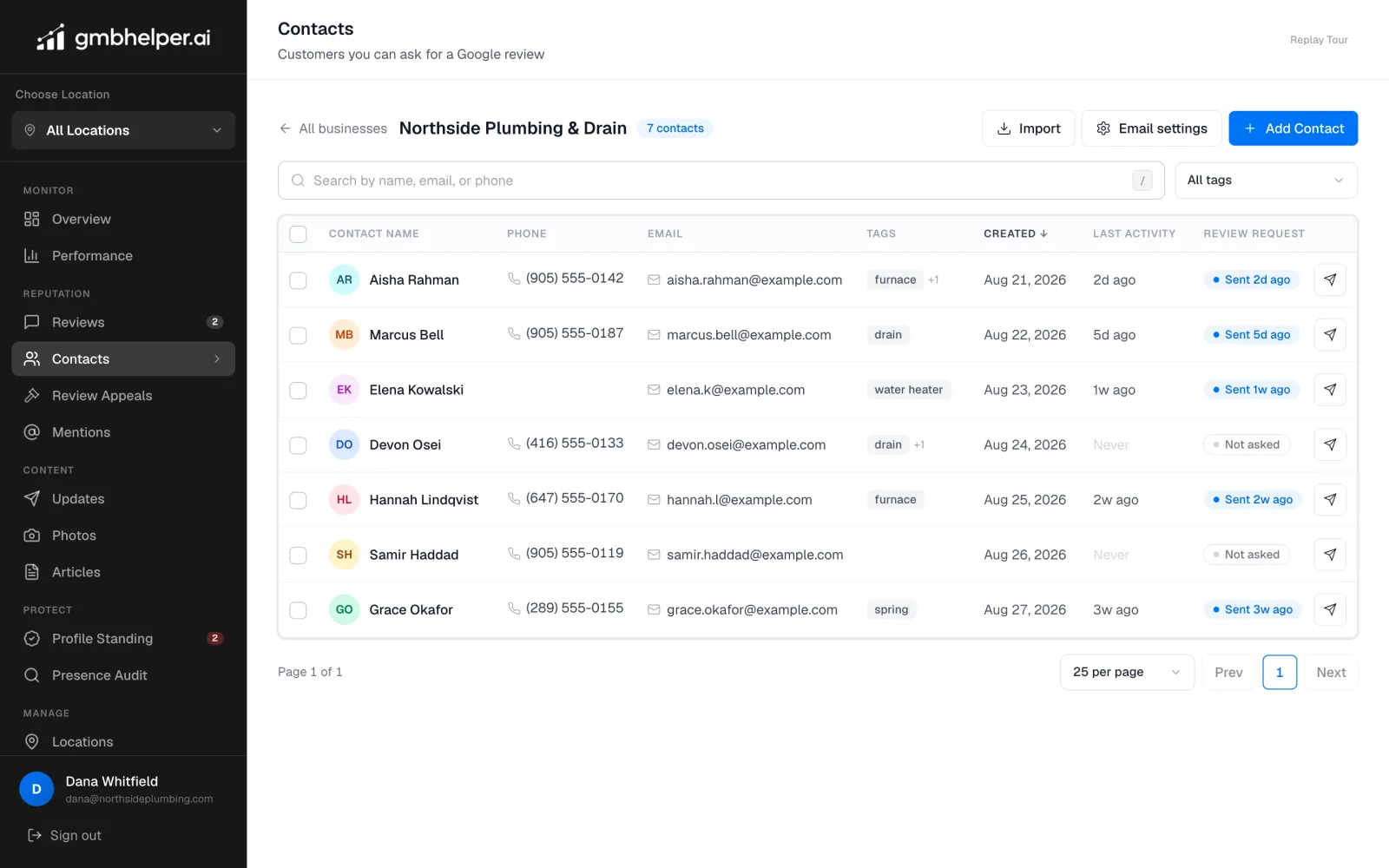
GMB Helper Contacts screen for one business with seven customers, their tags, and when each was last sent a review request
Contacts per business, with the last review request beside each name.

What is going on

Why review volume stalls

Most happy customers never leave a review because nobody asked, or the ask came from an unfamiliar address that went to spam, or it arrived with no link and the customer gave up at the search box. The businesses that climb in the map pack ask consistently, make it one tap, and follow up on every review that arrives.

Google also has rules here that catch people out. You cannot offer money or discounts for a review, you cannot ask only the customers you expect to be happy while steering the unhappy ones elsewhere, and you cannot post reviews on a customer’s behalf. A request that goes to every customer with the same link is both the rule and the thing that works.

The other half of the problem is what happens after the review is posted. A profile where the owner answers every review, including the awkward ones, reads as a business that is paying attention, and Google weighs reply activity when it scores the profile. Asking without answering leaves half the value on the table.

How GMB Helper.ai handles it

From a finished job to a published reply

Contacts live under the business they belong to, so a multi-location operator or an agency keeps each customer list where it should be.

  1. 1

    Connect your Gmail

    Connect the Gmail account you already write from. The permission asks only to send email on your behalf, nothing to read. Requests go out from your own address, so they look like they came from you, because they did.

  2. 2

    Add contacts

    Add a customer by name, email, and phone, or import a list from a CSV. Tag contacts by job type, source, or anything you sort by, and search across name, email, and phone.

  3. 3

    Send the request

    Pick one contact or a page of them and send. The email carries your business’s Google review link, the same link to everyone. Each contact shows when it was last asked so nobody is nagged.

  4. 4

    The review arrives, the reply is ready

    New reviews are usually detected within about ten minutes. A reply is drafted in your brand voice, with no reviewer first names leaked and no repeated openers. Hybrid mode publishes the good ones and holds anything under four stars for you.

Why sending from your own address matters

A review request from a platform address the customer has never seen lands in promotions or spam and is deleted on sight. One from the address that sent the quote and the invoice gets opened. GMB Helper.ai sends through your connected Gmail account, so the message carries your name, your address, and your reputation with that customer, and any reply comes straight back to your inbox.

Google’s rules, built in

The request sends the same review link to every contact. There is no screen that asks the customer how they feel first and routes the unhappy ones to a private form; Google calls that review gating and it can cost the profile its reviews. There is no incentive language in the email. Asking everyone, plainly, is what Google allows and what produces a review profile that looks like a real business.

When to ask, and what the email says

Ask while the job is fresh: the day the work is finished, the order is delivered, or the appointment ends. A request a month later gets ignored. Keep the email short and personal, one or two sentences from you, then the link. The customer should be able to leave the review in under a minute from their phone, and the Google review link opens straight into the rating box.

Ask every customer once. The contact list shows when each person was last asked, so nobody is chased twice, and a customer who did not respond is simply asked again after their next job rather than nagged about the last one. Consistency beats volume: a business that asks after every job collects more reviews in a year than one that blasts its whole list once and stops.

  • Ask on the day the work is done, from the address that did the work
  • One link, the same for everyone, straight to the Google rating box
  • One ask per job, tracked per contact, no repeated nudges
  • Reply to every review that arrives, in your own voice

For agencies running this for clients

Each client business has its own contact list and its own connected sending address, so requests always come from the client, not from you. Import the client’s customer export once, tag by service, and the request history stays with the business when someone else on your team picks it up.

Straight answers

What we will not promise

  • Requests are email only. Phone numbers are stored on the contact, but there is no text messaging today.
  • Gmail is the sending account today. Outlook and Microsoft 365 are not connected yet.
  • Google decides whether a review is published. Asking correctly raises the count; nothing can force it.
  • We do not match a review back to the contact who left it. Google does not expose that, and guessing would be wrong often enough to be useless.

Questions

Review request questions, answered plainly.

Is it allowed to ask customers for Google reviews?

Yes. Google encourages it. What is not allowed is paying or discounting for reviews, asking only the customers you expect to be happy, or writing reviews for them. The request sends one link to everyone, with no incentive, which is the compliant way and the effective one.

Do I give you my Gmail password?

No. You connect Gmail through Google’s own permission screen, and the only permission requested is to send email on your behalf. You can remove it from your Google account at any time.

Can it send text messages?

Not today. Requests go by email from your connected Gmail. Phone numbers are stored with the contact for your own use.

Can I import my existing customer list?

Yes. Import a CSV with names, emails, and phone numbers, then tag and search it. Contacts belong to the business they were imported into.

What happens when a customer leaves the review?

It is detected within about ten minutes, a reply is drafted in your voice, and in Hybrid mode the four and five star replies publish on their own while lower ratings wait for your approval.

Start asking. The reviews follow.

Connect Gmail in the 7-day free trial, import your customers, and send the first batch today.